Online Manual
MSP 325N User Manual

3.5.3 Recording
The MSP 325N V2 supports recording the Main Output picture after inserting a USB drive or solid-state drive into the USB-A interface of the MSP 325N V2.
- The maximum supported capacity for USB drives is 128GB, for SSDs it is 2TB.
- The supported format is exFAT.
- Set the recording bitrate and resolution.
- Low quality recording bitrate is 4Mbps; Medium quality recording bitrate is 8Mbps; High quality recording bitrate is 16Mbps.
- Supports up to 4K resolution.
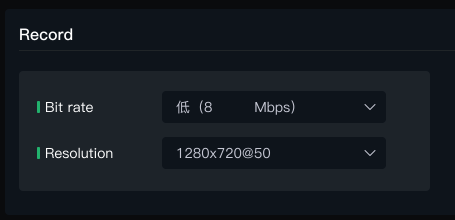
- Insert the USB drive. On the Recording interface, the MSP 325N V2 will automatically read the used capacity and free capacity of the USB drive. Click the recording switch, and the MSP 325N V2 will start recording and display the total recording duration and recording progress.

- During recording, you can view the recording dynamics and time on the Operation Status page.

- After turning off the recording button, the recording content is automatically saved, and the inserted USB drive or portable hard drive is automatically ejected from the device.
- Insert the USB drive or portable hard drive into a computer to view the recording files. The file format is MP4.

📢  **Note**

- The supported format for USB drives is exFAT. If the drive is not formatted correctly, please reformat it: On a Windows computer, select "exFAT" as the file system and set the allocation unit size to 128KB.
- Video recordings are automatically segmented into 4GB files. Recording will stop automatically when the disk is full. To avoid interruptions, regularly check the remaining space of the USB drive in the recording menu.