Online Manual
MSP 325N User Manual

3.1.2 Connect the MSP 325N V2 to the Network
The MSP 325N V2's DHCP function (automatically receiving assigned IP address) is disabled by default.
After the first login using the static IP, you need to go to** Network ** in **Options ** to enable DHCP. This allows the device to obtain an IP address assigned by the router and access the network.
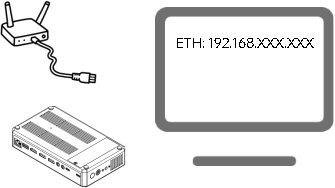
- Power on the MSP 325N V2 and connect it to the router using an Ethernet cable.
- Use an HDMI cable to connect the HDMI OUT interface on the right panel of the device to a display.
The display will show the IP address assigned to the device by the router .
The URL in the example below is for illustration only; please use the actual IP address assigned by your router).