Online Manual
MSP 331 (Family) User Manual

3.2 PotPlayer Capturing
Download [Global Potplayer](https://potplayer.tv/)
- Connect the MSP 331 device to your computer using a USB cable.
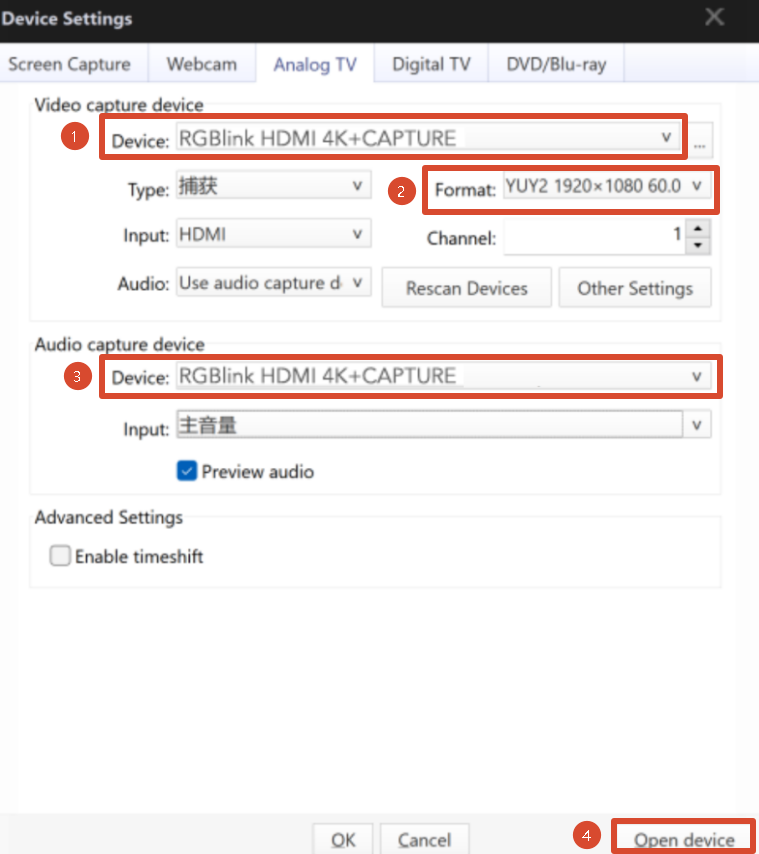
- Open PotPlayer and select Open > Device Settings from the drop-down menu.
- Under Video capture device, select the corresponding device, such as
RGBlink HDMI 4K+CAPTURE. - Click Format and select the desired video resolution from the drop-down menu.
- Under Audio capture device, select the corresponding device, such as
RGBlink HDMI 4K+CAPTURE. - Click Open Device.
📢  Notes

Available video resolutions depend on the options listed in the Format drop-down menu.