Online Manual
mini-max User Manual

1.3 Ports Info
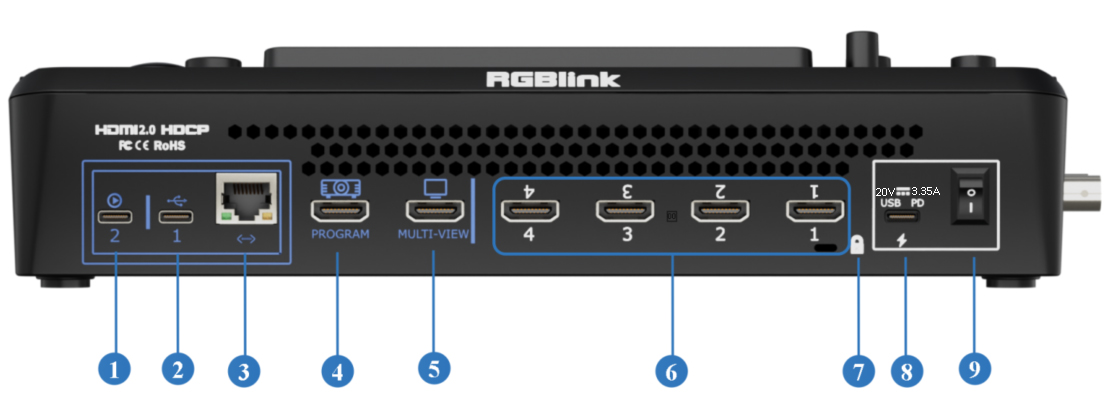
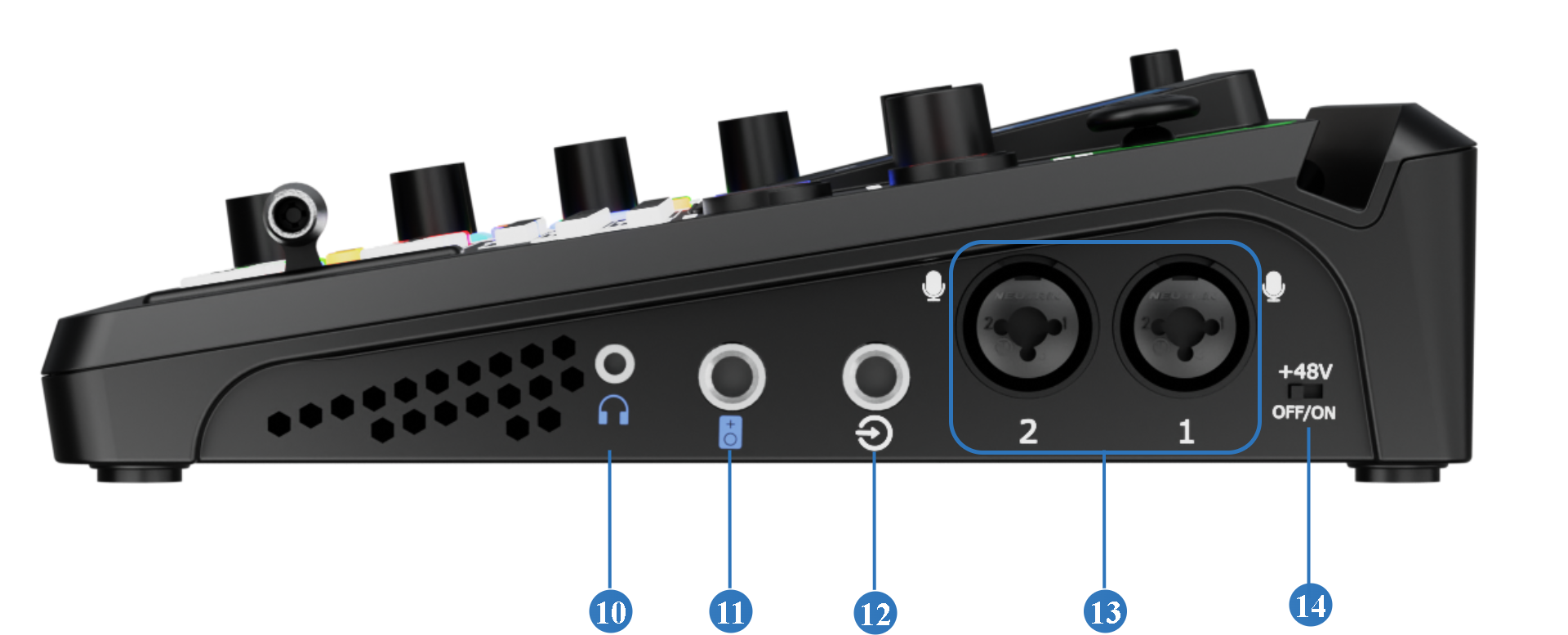
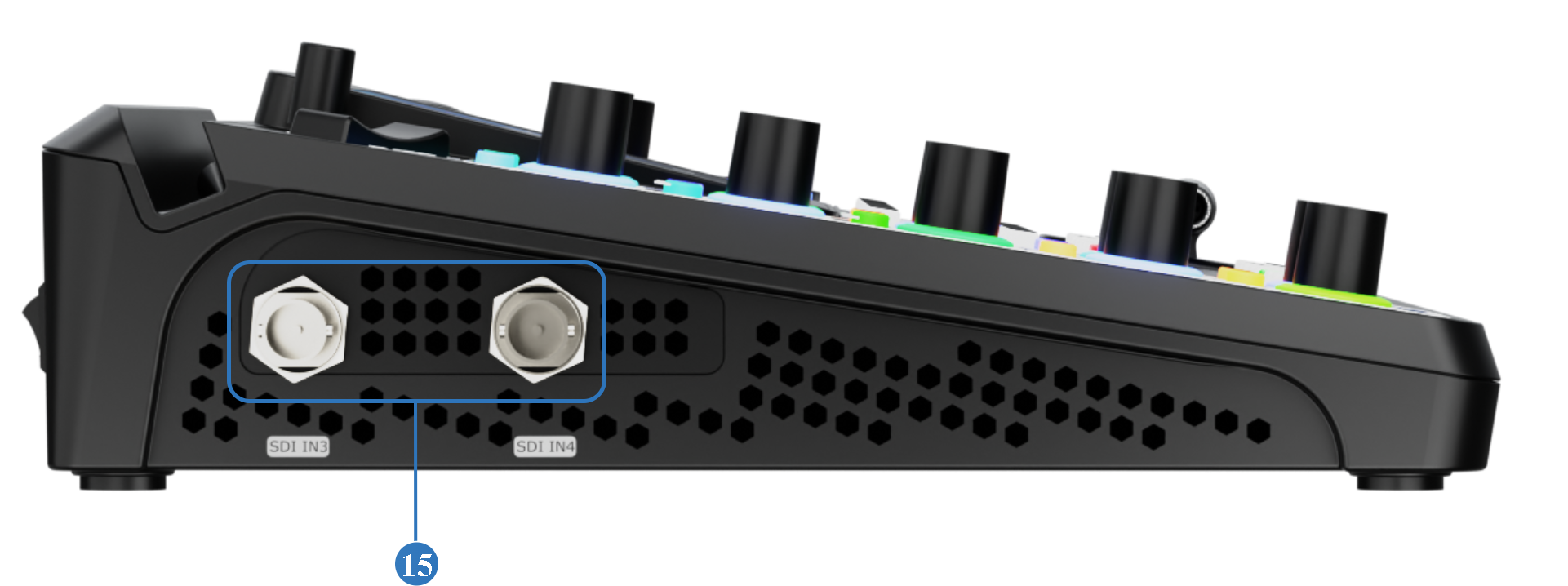
| No. | Port | Description |
|---|---|---|
| ❶ | USB-C 2 | Connected to a computer (via USB-C cable) or an Android device (via OTG cable). Recognized as a webcam by a third party software like OBS or zoom to capture and output the program view on air in applications like remote video conference. |
| ❷ | USB-C 1[1] | + Connect to a USB camera as the fifth input signal (default function). + Record the Program output view to a USB drive or SSD. + Import audio, video, and image files from a USB drive. |
| ❸ | Ethernet Port | + Streaming: Go live over the internet without a computer. + Remote PTZ control via IP VISCA for IP workflow. |
| ❹ | PROGRAM Output | By default, it outputs the program feed but can be switched to output test color bars. |
| ❺ | MULTI-VIEW Output | When connected to a display, it monitors all input and output signals simultaneously in a multi-view layout. |
| ❻ | HDMI 1~4 IN | + Four HDMI input channels for connecting HDMI sources. + 4K60 resolution and downward compatible with all resolutions. |
| ❼ | Locking Hole | Use the T-lock to fix the device. |
| ❽ | USB-C Power Socket | PD protocol support, 20V 3.25A. |
| ❾ | Power Switch | Boat-shaped switch. Press downward to turn on the switch. |
| ❿ | Headphone Output | 3.5mm mini-jack for audio monitoring. |
| ⓫ | 6.35mm TRS Jack | Balanced TRS audio output. |
| ⓬ | Line-in | Balanced 6.35mm TRS jack to connect to PC, mobile phone, or audio console. |
| ⓭ | MIC in | + XLR+TS input port to connect to microphone. + 48V Phantom Power supported. |
| ⓮ | +48VPhantom Power Switch [2] | + Default to OFF for safety. + Manually enable it when connecting a condenser microphone that requires 48V phantom power. |
| ⓯ | SDI 1~2 Inputs | + Two 12G-SDI input ports can be connected to UHD cameras and other input sources. + 12G SDI compatible with 6G/3G/HD/SD-SDI. |
🚨  Hot-Plugging Warning

48V phantom power supplies operating voltage to condenser microphones through the XLR input.

Do not connect or disconnect microphones or XLR cables while 48V phantom power is enabled.

When phantom power is turned on, voltage is present on the XLR connector. Connecting or disconnecting cables under power may generate current surges that can result inloud pops or unwanted noise,microphone malfunctionordamage to the audio circuitry of the device or connected equipment.
📢  Notes

[1]The two USB-C ports are functionally independent. The functions available on one USB-C port cannot be accessed through the other port via a USB hub, docking station, or adapter.

[2]Phantom power should be enabled only when using a condenser microphone that requires external power. Disable phantom power before connecting other audio devices.
📢  Compatibility Notice

Only H.264-encoded UVC cameras are supported for ❷ UVC input.

Compatibility may vary between UVC camera models and manufacturers. If a connected camera cannot be detected or does not function properly, please contact RGBlink Technical Support.