Online Manual
stream-gO

2.8 Install Your Product
Power Connection
Power the device using the included power adapter and USB-C cable, or supply power via PoE.
After the power is properly connected, the device automatically turns on.
The 2.1-inch full-color touchscreen displays the stream gO expression standby screen by default.
Swipe left or right on the screen to switch interfaces and enter the Home page.
📢  Important

The device must remain connected to power during operation.
Network Connection
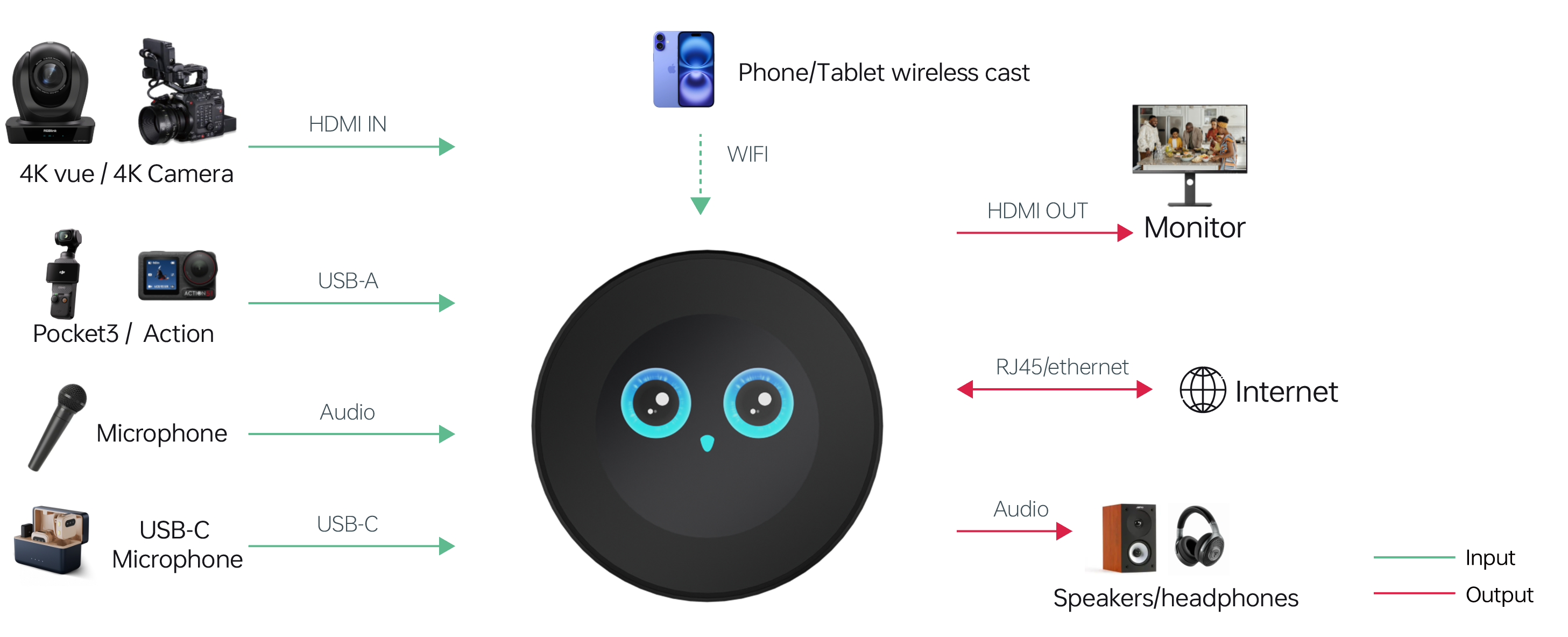
Connect the device to a network using one of the following methods:
- Connect to a known Wi-Fi network with an available SSID and password.
- Connect an Ethernet cable from a network device (such as a router) to the device's LAN port.
Input Signal Connection
- Connect HDMI or UVC input sources to the device's** HDMI/UVC input port** using appropriate cables.
- Connect the HDMI output port to a display device using an HDMI cable.
USB Drive Connection (for agentZ Edition)
The agentZ edition of stream gO requires a USB drive for recording, live streaming and storage features.
if no USB drive is connected, the system prompts you to insert a USB drive and restart the device to continue. And the following features are unavailable:
- Recording
- Go Live
- Check Device Info > Device QR Code
- Check Device Info > Device Storage
📢  Tips

USB 3.0 flash drives are recommended for optimal performance.