Online Manual
TAO-1tiny-2

2.3.2 Network Configuration
The TAO 1tiny 2 and the computer must be on the same local area network (LAN), meaning the first three segments of their IP addresses must be identical. Out of the factory, the DHCP function (automatic IP address acquisition) on the TAO 1tiny 2 is disabled by default.
After initially logging in using the static IP, you need to go to Options page >Network Port to enable DHCP. This allows the device to obtain an IP address assigned by the router and join the network.
Wireless Network
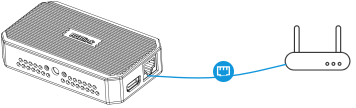
After connecting the router and the TAO 1tiny 2 with an Ethernet cable, set the computer's WiFi to the same SSID as the router. The TAO 1tiny 2 and the computer will then be on the same LAN without further configuration.
Wired Network
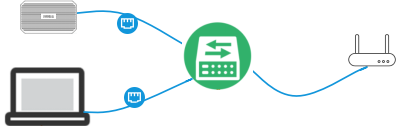
Connect the router to a switch using an Ethernet cable. Then connect both the TAO 1tiny 2 and the computer to the same switch using Ethernet cables. The TAO 1tiny 2 and the computer will be on the same LAN.