Online Manual
msp-325n-v2

3.1 Log into the Device Management Page
The MSP 325N V2's management page is accessed via its IP address. Setup steps:
- Power on the MSP 325N V2 and connect it to the router via Ethernet.
- Connect the device's HDMI OUT port to a display using an HDMI cable. The IP assigned by the router will appear on-screen (Example IP shown in the figure below. Use the actual router-assigned IP.).
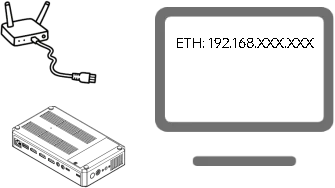
- Open a browser and enter the IP address to access the web management page. The default username and password are:
- Username: admin
- Password: admin
📢  Important

To ensure your information security, it is recommended to revise your password after you log into for the first time.
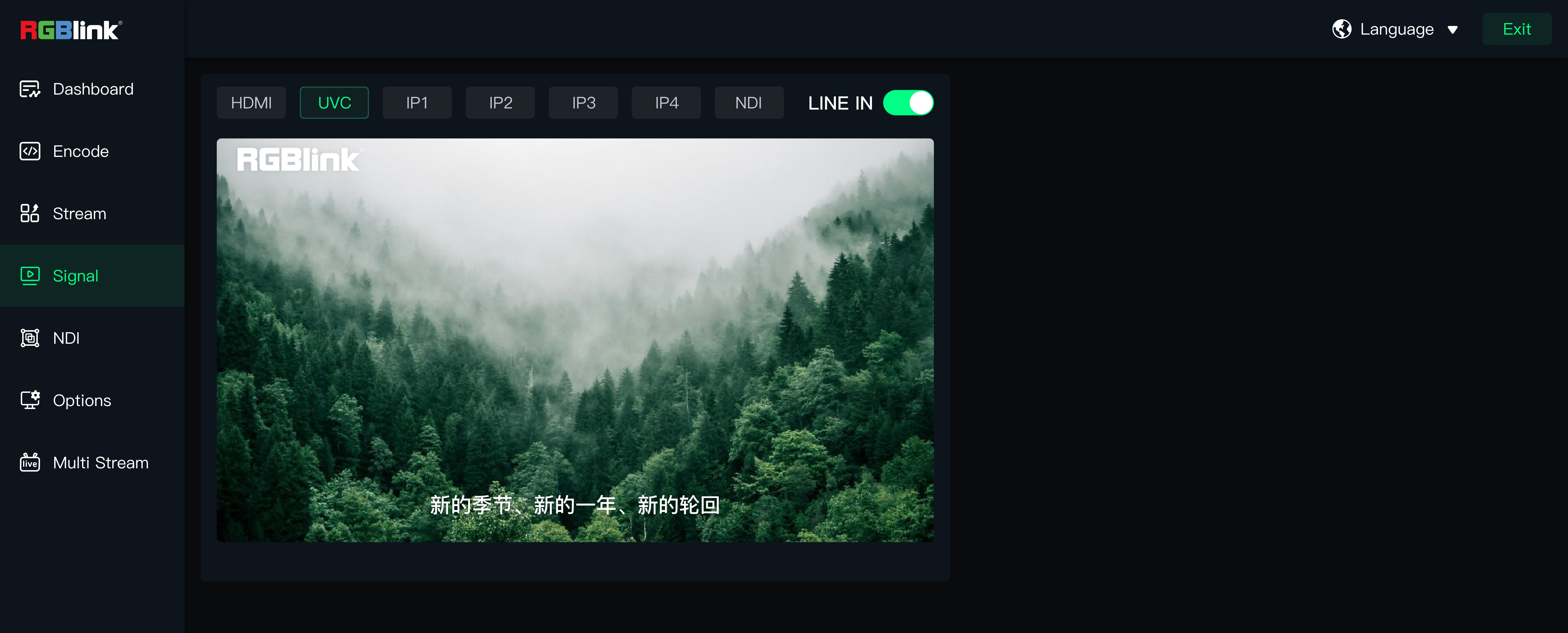
In the Device Management Page, you can check the followings:
| links to User Manual | ||
|---|---|---|
| Dashboard | Current system status of the device (CPU usage, memory usage, core temperature), network and connected port. | 2.2 Dashboard |
| Encode | The configuration of compression parameters for video and audio | 2.4 Encoding Settings |
| Stream | Global configuration, playback address, recording, and volume adjustment | 2.5 Output Settings |
| **Signal ** | Preview all signal sources connected to the device. | 2.3 Signal Switching |
| NDI | NDI encoding and NDI decoding | 2.6 NDI Encoding; 2.7 NDI Decoding |
| Options | Network port, fan, change password, time settings, USB camera, factory reset and upgrade. | 2.8 Options |
| Multi Stream | Bind to TAO Cloud platform to achieve multi-platform live streaming. | 2.9 Multi-Platform Live Streaming |