Online Manual
Ystreamer

2.1.2.4 Button Panel
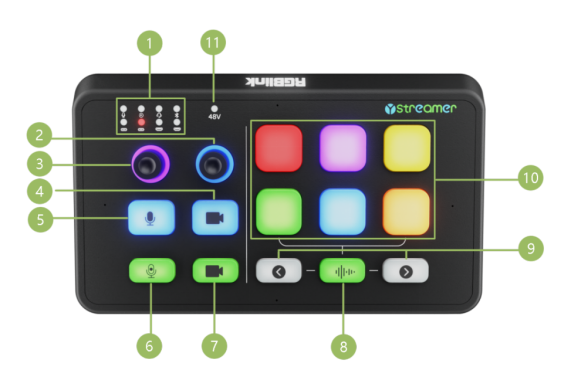
| No. | Items | Description | |
|---|---|---|---|
| ① | 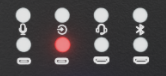 | Audio Input Source Selection Indicator | Green light indicates the source is selected. The input sources, from top to bottom and left to right, are: XLR, TRS, TRRS, Bluetooth; UAC 1, UAC 2, HDMI 1, HDMI 2 |
| ② |  | Output Volume Adjustment | Press to toggle output mute. • Active volume portion: Purple • Inactive volume portion: Red • Mute: All red |
| ③ |  | Input Volume Adjustment | Rotate the input knob to select a source, press to confirm, then rotate to adjust the selected source's volume. Volume level is indicated by the ring light around the knob: • Active volume portion: Blue • Inactive volume portion: Red • Mute: All red |
| ④ |  | HDMI 1 UVC Output Black Screen Control | • Output active: Blue • Black screen output: Red |
| ⑤ |  | One-Key Mute | Press to instantly mute the selected input source. • Audio output: Blue • Mute: Red |
| ⑥ |  | Audio Recording Switch | • Recording: Red • Stop recording: Blue |
| ⑦ |  | HDMI 2 UVC Output Black Screen Control | • Output active: Blue • Black screen output: Red |
| ⑧ |  | Built-in Microphone On/Off Switch | / |
| ⑨ |  | Page Up / Page Down | Navigate up/down one page |
| ⑩ | 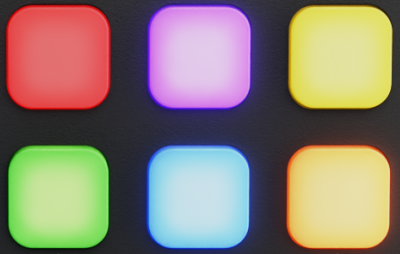 | 6 Customizable Buttons | Supports 4 pages. 8 factory default sound effects included; all others can be customized via software. Each sound effect is replaceable. |
| ⑪ |  | 48V Phantom Power Indicator | Red light on when phantom power is enabled; red light off when disabled. |