Online Manual
mini-iso-manual

3.9 Preset Views
mini-ISO supports saving and recalling scene presets, with up to 8 scenes available.
A scene preset saves the current input source status, source layout, chroma key settings, PTZ presets, and other settings. When a saved scene is recalled, the device restores the corresponding configuration.
3.9.1 Save a Scene
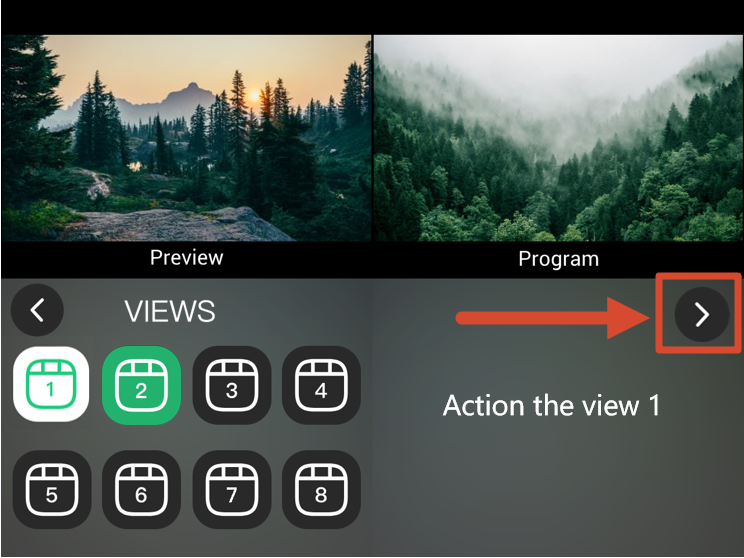
- After configuring, select VIEWS from the main menu to enter the scene settings.
- Tap the right arrow to open the save page.
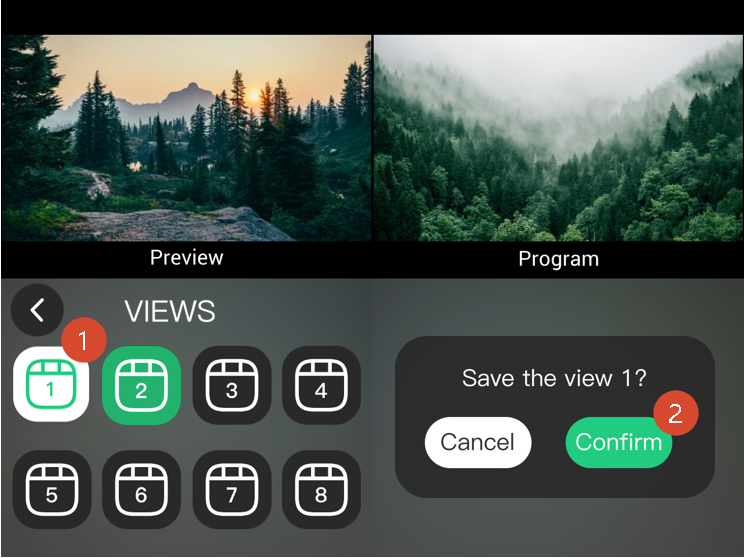
- Select a scene button (Scene 1–8).
- Select Confirm in the confirmation dialog to save the scene.
- After the scene is saved, its button turns green. Unsaved scene buttons remain gray.
 | 👉 |  |
|---|
3.9.2 Recall a Scene
- Open the VIEWS page from the main menu.
- Tap a saved scene button to recall the corresponding preset.