Online Manual
mini-pro v3 User Manual

1.2 Front Panel
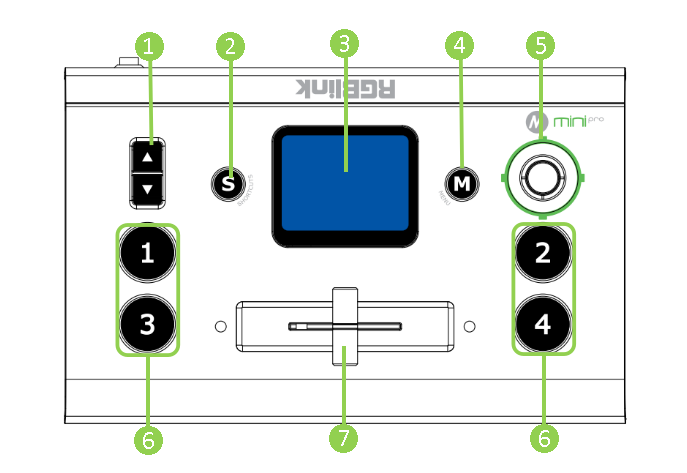
| No. | Item | Description |
|---|---|---|
| ❶ | Toggle | + Preset Menu: Adjust Program volume. + PIP Mode: Proportionally adjust size of sub-picture. + PTZ Control: Zoom in and zoom out. + IP Setting: Adjust IP values. |
| ❷ | S Button | Press shortcut button to enter quick operation interface, which includes 8 Presets to load, Audio, Record on/off, Stream on/off. |
| ❸ | Touch Screen | + For menu operation and 4 inputs monitoring. + PTZ Control: Monitor the screen of the currently controlled camera, and save the currently set screen by tapping it, and a call button can be formed. |
| ❹ | M Button | + Single Click - 4-window Monitoring Interface: Press to enter Menu Interface. - Menu Interface: Press to enter 4-window Monitoring Interface. - Others: Press to exit. + Long Press - 4-window Monitoring Interface: Press to lock control panel. - Others: Press to 4-window Monitoring Interface. |
| ❺ | 5-Direction Joystick | Move Up/Down/Left/Right + PTZ Control: Set pan, tilt and zoom for PTZ camera. + Layer Adjustment: Position adjustment for sub-layer. |
| ❻ | ①②③④ | + Button Unlit: no input signal. + Button Lit White: unselected input signal. + Button Blinked Green: Preview out. + Button Lit Red: Program out. |
| ❼ | T-Bar | Preview and Program views can be transitioned by pushing T-Bar. |