Online Manual
mini-pro v3 User Manual

1.3 Front Panel
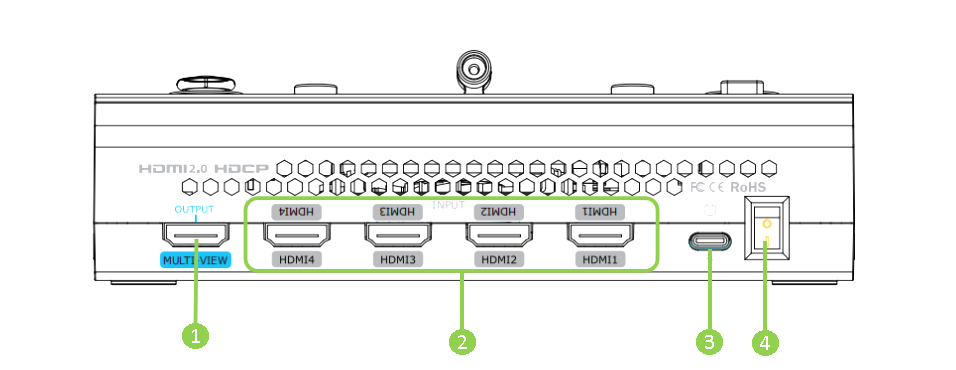
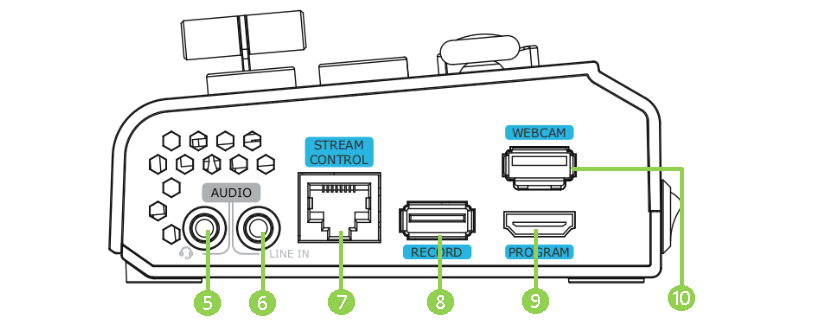
| No. | Item | Description |
|---|---|---|
| ❶ | MULTI-VIEW Output | Default as multi-view output, can set as Program, HDMI 1~4 or AUX output. |
| ❷ | HDMI 1~4 Inputs | + Four HDMI input channels for connecting HDMI sources. + 4K resolution and downward compatible with all resolution. |
| ❸ | USB-C Power Socket | PD protocol, 12V/2.5A. |
| ❹ | Power Switch | Rocker switch to power on or off the device. |
| ❺ | MIC In & Audio Out | Support one passive MIC input and one audio output via 2-in-1 audio split cable. |
| ❻ | Line-in | Active audio input, connect to mobile phone, computer or audio console. |
| ❼ | Ethernet Port | + Control: Connected to PTZ camera for direct control. + Stream: Access to internet for live streaming. |
| ❽ | RECORD | Connect to SSD or U disk to record audio and video from Program. |
| ❾ | PROGRAM Output | Default to output real-time scene, which can be set as Multi-view Preview or Test Pattern. |
| ❿ | WEBCAM | USB Stream Output: Capture signal via third party streaming software and push to live broadcasting websites. |