
API / Commands / Layer Configuration
Layer Configuration
Overview
This command is used to adjusts the designated layer’s scale and crop values, as well as switches its signal source.
Device Supported
Q Series: Q16pro Gen 2
Command Structure
| Element | Attribute | Detail |
|---|---|---|
| HEAD | < | |
| TYPE | T | |
| ADDR | 0x00 | default |
| SEQN | 0x00 | default |
| CMMD | 0xF2 | Set layer property |
| DAT1 | 0x00 | default |
| DAT2 | 0x00~0x9F | Layer number 1~160 layer 1(0x00), layer 2(0x01), layer 32(0x1F) etc. |
| DAT3 | 0x00 | Unused |
| DAT4 | 0x00 | Unused |
| CHKS | Check sum=ADDR+SN+CMD+DAT1+DAT2+DAT3+DAT4 | |
| END | > | |
| DATA BLOCK | [ | The string starts with "[" string vaules are in decimal |
| crop_posx | layer cropping vaule: X horizontal position | |
| crop_posy | layer cropping vaule: Y Vertical position | |
| crop_width | layer cropping vaule: witdth | |
| crop_height | layer cropping vaule: Height | |
| scale_posx | layer scale value: X horizontal position | |
| scale_posy | layer scale value: Y Vertical position | |
| scale_width | layer scale value: width | |
| scale_height | layer scale vaule: height | |
| input | Signal scource 0~79 | |
| 0: input 1 | ||
| 1: input 2 | ||
| 2: input 3 | ||
| ..... | ||
| 79:input 80 | ||
| ] | The string ends with ] |
Example Transmit
- Set layer property of layer 2
| Command | HEAD | TYPE | ADDR | SEQN | CMMD | DAT1 | DAT2 | DAT3 | DAT4 | CHKS | END |
|---|---|---|---|---|---|---|---|---|---|---|---|
| ASCII | < | T | 00 | 00 | F2 | 00 | 01 | 00 | 00 | F3 | > |
| HEX | 3C | 54 | 30 30 | 30 30 | 46 32 | 31 38 | 30 31 | 30 30 | 30 30 | 36 33 | 3E |
Application
To implement the configuration of layer's sacle, crop and sources, the following combination of commands must be executed:
- Layer Configuration + Group TAKE
The combination invokes layer changes
- Layer Configuration + Save Scene + Group TAKE
The combination invkers layer changes and saves changes to designated scene/bank
Command Sample
<T0000F200010000F3> [input=2] //switch layer2's signal to sources 3 <T0000681A01000083> //save changes to scene 1 <T0000F0380005002D>0200000002 //group TAKE <F0000F200010000F3> <F0000681A01000083> <F0000F0380006012F>//feedback: switch and save successful
<T0000F200010000F3>[scale_posx=100,scale_posy=100,scale_width=500,scale_height=800] //set layer2 to position (100,100) with 500 width and height 800 <T0000681A01000083> //save changes to scene 1 <T0000F0380005002D>0200000002 //group TAKE <F0000F200010000F3> <F0000681A01000083> <F0000F0380006012F> //feedback: set and save successfully
Application
In the scenario where users need to configure layer multiple time under same scene/bank, its suggest to follow below workflow:
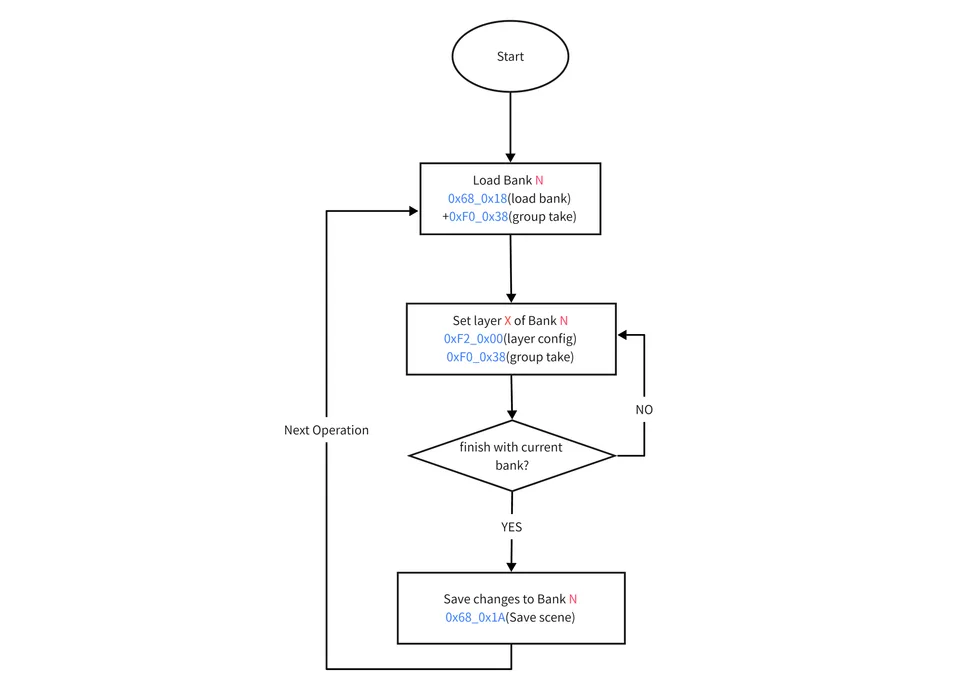
Reference
For details of Group TAKE command, refer to article ‘’TAKE Command‘’
For details of Save Scene command, refer to article "Save Scene/Bank"