Online Manual
TAO-1pro-2

2 Install Your Product
2.1 Connecting the Power Supply
TAO 1pro 2 can be powered by a power adapter or battery.
- Using a power adapter: Connect the power adapter to the power input of TAO 1pro 2.

- Using a battery: The battery is not included with the device. For compatible battery models, see Optional: Install the Battery.
2.2 Connecting Input Sources
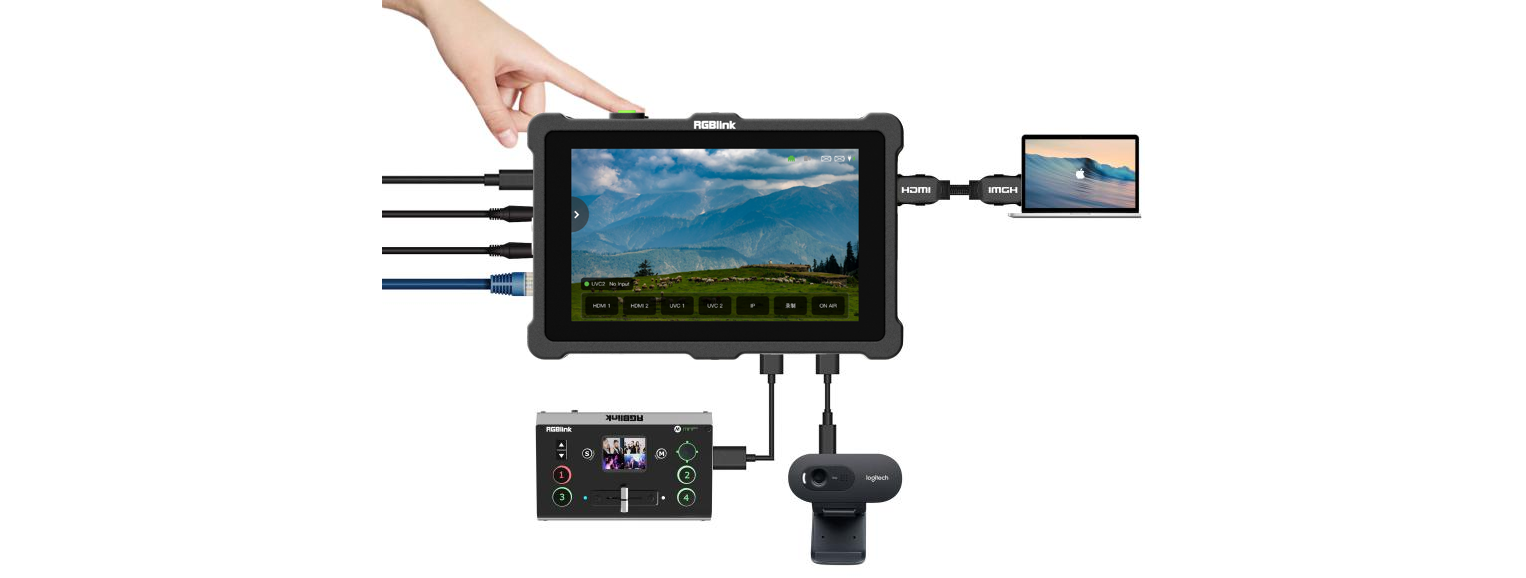
TAO 1pro 2 provides two HDMI 1.3 inputs and two USB 3.0 inputs for connecting cameras, computers, and other compatible video devices.
- HDMI input: Connect the video source to an HDMI input on TAO 1pro 2 using an HDMI cable.
- USB camera: Connect a UVC-compliant camera to a USB 3.0 input on TAO 1pro 2 using a USB cable.
After an input source is connected, TAO 1pro 2 detects the input signal and displays the corresponding video and resolution on the touchscreen.
📢  Notes

TAO 1pro 2 supports 1080p@50/60 input. Use standard progressive signals to ensure proper video capture.

2.3 Connecting a Display Device
TAO 1pro 2 provides one HDMI 2.0 output for connecting a display, monitor, or other HDMI display device.
- Connect the HDMI output of TAO 1pro 2 to the HDMI input of the display device using an HDMI cable.
- Turn on TAO 1pro 2 and the display device.
- Configure the HDMI output parameters as needed.
📢  Notes

An HDMI 1.3 HD monitor is recommended for general use.

2.4 Connecting to a Network
TAO 1pro 2 connects to a wired network through its Gigabit Ethernet port for network streaming, NDI transmission, and Web App control.
Connect the Ethernet port of TAO 1pro 2 to a router or local area network using an Ethernet cable.
For Web App control, see 3.2 Web App.

2.5 Connecting a Microphone and External Monitoring Device
TAO 1pro 2 provides one 3.5 mm microphone input and one 3.5 mm audio output for connecting a microphone and headphones or external speakers, respectively.

2.6 Turning On TAO 1pro 2
After connecting the input sources, output device, and power supply, press the power button on the top of the device. TAO 1pro 2 starts up and displays the home screen.
📢 Notes

It is recommended to connect the input sources, output device, and network before turning on the device.