Online Manual
TAO-1pro-2

3.2.4 Network Stream
Network Stream is used to configure network video input and RTMP streaming output.
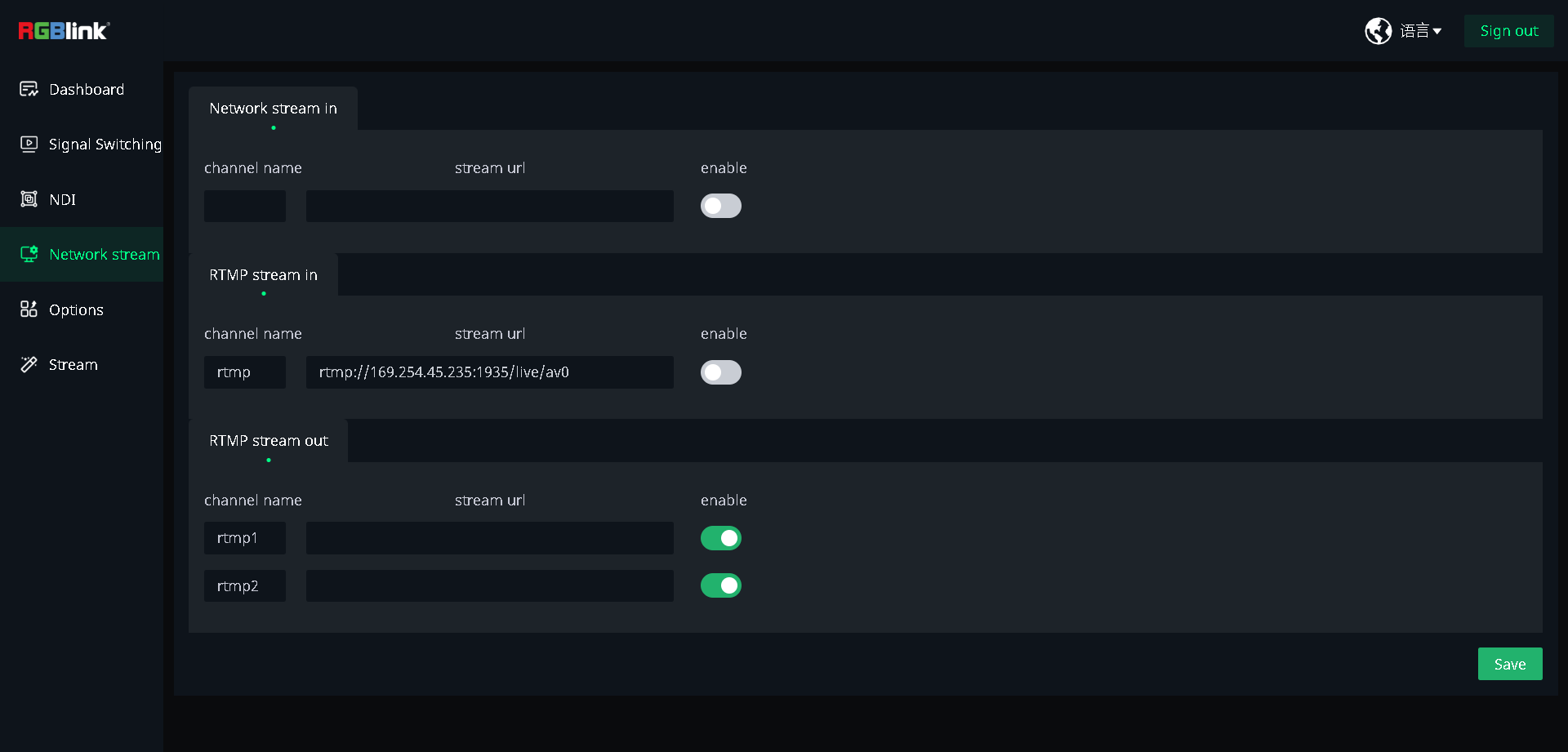
Input
TAO 1pro 2 supports RTSP/RTMP stream decoding for receiving video streams over the network and using them as the IP1 input source.
- Enter a channel name and enter the network or RTMP stream URL in stream url.
- Turn on the corresponding enable switch.
- Tap Save to apply the settings.
Output
TAO 1pro 2 supports RTMP streaming, with up to two different platforms or services supported per view.
🚨 Risk Warning

Do not share your stream key with anyone or display it during a live stream. Doing so may result in unauthorized account access, stream hijacking, or other potential risks and losses.

If your stream key is exposed:

1. Immediately reset the stream key on the corresponding platform.
2. Stop the current live stream.
3. Restart streaming using the new stream key.
- View Streaming to Live Platforms to check how to get stream key from other platforms.
- Enter the streaming URL provided by the platform in stream url for the corresponding RTMP output channel.
- Turn on the corresponding enable switch.
- Tap Save to apply the settings.
📢  Notes

RTMP streaming uses landscape orientation. No resolution setting is required, and the streaming bitrate is fixed at 4 Mbps.

After the device restarts, RTMP streaming is disabled by default. Enable ON AIR again to start streaming.