Online Manual
TAO-1pro-2

4 Upgrade
TAO 1pro 2 supports software upgrades via a USB drive.
🔔 The latest version is V1.5.9_3.91_2.18.
⚠️  Notes

TAO 1pro does not support upgrading to the TAO 1pro 2 software via a USB drive. Do not use the TAO 1pro 2 upgrade package to upgrade a TAO 1pro device.
Preparing for the Upgrade
Go to the RGBlink official website and open the TAO 1pro 2 product page. Download the corresponding upgrade package from Downloads > XPOSE / TAO APP / Firmware.
📢  Notes

1. The USB drive must use the FAT32 file system.
2. Do not extract or rename the upgrade package.
3. Do not disconnect the power during the upgrade. Otherwise, the device may fail to start properly.
Upgrade Procedure
- Copy the upgrade file to the root directory of the USB drive.
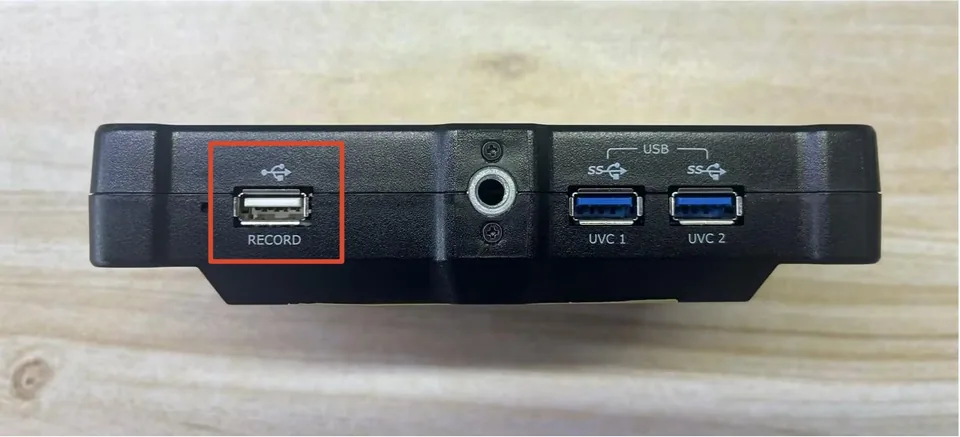
- Insert the USB drive into the USB port labeled RECORD on the device.
- Go to Setting > About > Update.
- Select the target version, tap Upgrade, and tap Yes in the confirmation dialog to start the upgrade.
- The device displays "Upgrading. Do not turn off the power during the upgrade."
- Wait for the device to restart automatically.
- Go to Setting > About > Update again to view the software version.
- Confirm that the displayed version matches the target version.